Costs are always a consideration and they occur in many ways. The backup process has costs so we can think about optimising it to reduce the amount of time and effort is required to perform that job.
Reducing Time and Energy
FileMaker files containing text compress well. You could expect them to compress to one third or one quarter. However, images are already in a binary format, so (1) they don’t reduce in size, (2) compression routines will struggle to compress them without much success, (3) that soaks up time, CPU, and energy. A good strategy is to put images into a separate file to the text (not always possible). You can then apply a strong compression ratio to the files containing text and you don’t waste time, CPU and energy trying to compress the images.
Reducing Storage Needs
Storage is cheap but you may want to moderate the amount you need. As the archive of backups age, how important is each backup? Everybody has different needs so the answer is always different. When my clients don’t have any special needs I suggest daily backups for the last month. Monthly backups for the last year. Everything older, one backup per quarter.
With that strategy the 99 file limit enforced by FMS is sufficient to retain 14 years of backups.
99 - 31 = 68 // daily for last month
68 - 12 = 56 // one per month for last 12 months
56 / 4  = 14 // one per quarter of each year
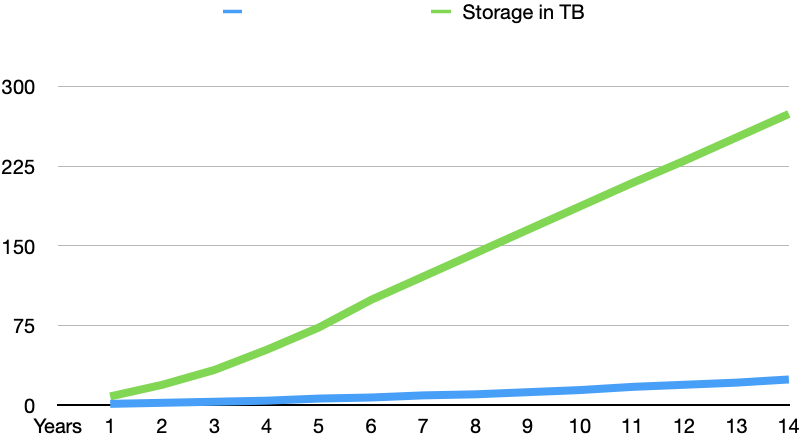
What amount of storage is required? Assuming that the database grows 10 GB per annum. Here’s the graph showing total storage requirements for my default backup strategy versus save all daily backups strategy. Obviously only keeping 4 per annum for previous years flattens the growth rate enormously.