ai2fm v2.37.3 Makes the FileMaker Round Trip Faster
Community-Driven DX: Bidirectional Auto-Convert
Previously, translating an emailed FileMaker XML snippet into .fmscript required two manual keyboard shortcuts.
Now, you can do it in one.
Simply press Cmd+Opt+Q (Mac) or Ctrl+Alt+Q (Windows), and the extension will instantly execute a true bidirectional translation in a split side-pane.
If you have raw FileMaker XML, it converts it into clean, linted .fmscript.
If you have .fmscript, it instantly compiles it back into exact FileMaker XML.
One keystroke, perfectly bidirectional.
 Explicit Shape Control (Multi-Line Preservation)
For the architects building complex script dependencies, you now have explicit control over how your code shapes are preserved.
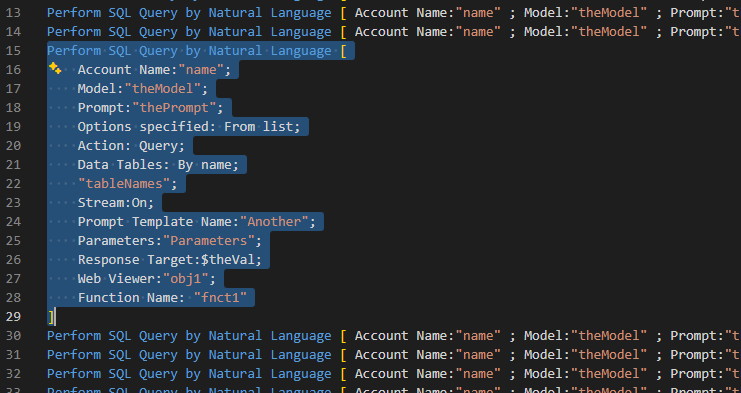
You can right-click any step to easily toggle between Single Line and Multi-Line formatting for ultimate readability.
 For complex scripts, readability matters. v2.37.3 gives you direct control over the shape of individual script steps.
You can now right-click a long step and choose:
FM Clipboard: Step -> Multi-Line
hat expands the step into a readable multi-line form.
If you want it compact again, right-click the multi-line step and choose:
FM Clipboard: Step -> Single Line
 This is especially useful for long AI-related script steps and complex steps with many parameters. You can keep dense code compact, or open it up when you need to inspect it carefully.
Engine Patches & Cleanups
We also deployed several reverse XSLT engine patches this week to improve stability.
One visible cleanup: array variables such as $varName[1] now render cleanly, without ugly bracket spacing.
That matters especially for those of you creating tutorials, screenshots, and teaching material with ai2fm.
https://ai2fm.com/announcements.html
 Copy XML from editor to FileMaker clipboard (XMSS, XMFN, XMSC, XMFD, XMTB, XMLO)

 Update: ai2fm Clipboard Bridge (v2.34.1) — Multiline Calcs & Full Unicode Validation
 ATTENTION !!! Unmapped Field/Table Reference
 Smaller Fixes Worth Mentioning:
 How to Upgrade