Yesterday I was able to open the file on Windows 11, not this morning. Since two different clients can not open the file, I suspect something is wrong on the server.
What is going wrong :
Sequoia is brain damaged - I still have the issue with Finder Windows being greyed out ?
Is MacOS 26 now trustable ?
Other ?
Speaking of Sequoia, when I did the initial setup, I used a Windows keyboard and MacOS recognized the layout fine. Afterwards I paired a Magic Keyboard with French Canada Layout, but MacOS still thinks it is the old Layout.
Thanks in advance for your suggestion.
Gilles
ADDITION
I rebooted the Mac mini, this rime I can open the file from FileMaker Pro on Windows 11, but it still fails on FMGo.
perhaps your mac mini server is going to sleep? Be sure you set the following setting:
System Settings / Energy / ‘Prevent automatic sleeping when the display is off’.
You might also want to set the display to never sleep ( in System Settings/Lock Screen ‘Turn display off when inactive’) though I’m not sure if this matters?
On occasion, when I wake up my MacBook, I can not connect to a file on a Mac Mini server. Trying a second time always works. I suspect that’s a problem on my MacBook not waking up fully?
The finder windows greyed out is very weird, but I suspect not related.
I would not run macOS 26 on either FileMaker Server, or Client right now.
I’m finding macOS 15.7.2 very stable for a FileMaker server, I have several mac minis running it and all have been flawless, and Lets Encrypt SSL certificates are a great convenience.
I've got a macmini running as a dev server and I often experience the "server not found" message. Originally I was running MacOS on the macMini and I experienced it then. I'm now running Ubuntu on the macMini and I still experience it, even on the local network. I suspect it is a hardware issue. Like you, it always connects perfectly on the second attempt.
This morning I found out that FMGo 19 was also installed: I deleted it, restarted the iPad, still the same.
I know that FMGo connects to the server, because when I connect, I use credentials for an account that is in the app I want to open. Once connected, the file is shown. Since the file shows up, the server found it. Bit when I tap the file, immediately I am told it's not found :
Could it be that that FMGo does not try to open the file from the Server ? The logs do not show anything about FMGo failing to open a file.
From the original screenshot, it looks as though there may be only one file being hosted, namely, the one with the enigmatic issue of not (always) being found.
As an attempt to gain additional perspective, I would consider hosting another simple dummy fmp12 file on the server to see if the same symptom surfaces with a different file, hence allowing you to test and maybe rule out out the possibility that the issue is particular to this one file.
My gut leans towards things already being considered in this thread, e.g., more of a server issue, and not a file issue, but my desire to try to be as comprehensive as possible would want to test a different file, nonetheless.
I note that the target file has a dot in its name. We know that should not present a problem, but we also know that, in some versions of FMP, there have been small FMP gotchas related to a file that has a dot in the file name. Admittedly, such problems, unlike this one, were 100% reproducible, so not quite the same, but still enough to make me want to test out a dummy file, just to rule that aspect out…
I shared on the server another copy of the file where the "." has been replaced by a "-". And that one opened !!! Looks like having a dot in the filename is still problematic with FMGo. And I wonder why. Since MacOS and iPadOS share code, would that be problematic also on MacOS ?
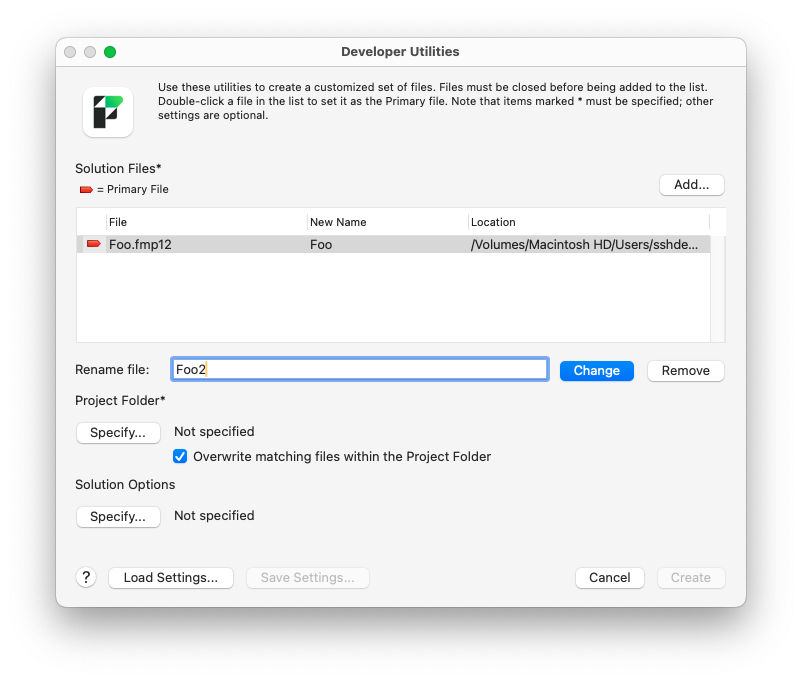
One last question, I remember that renaming a file does not change the internal name, the one FileMaker uses to identify the file, but I just can't recall how to change the internal name so that they match.
It’s definitely curious – and also a little difficult to feel 100% confident that the dot in the name is indeed the issue, though now it certainly seems like a possible explanation.
Maybe you are thinking of the Developer Utilities, located under the Tools menu?: